PageZephyr Search3.06
Publisher Description
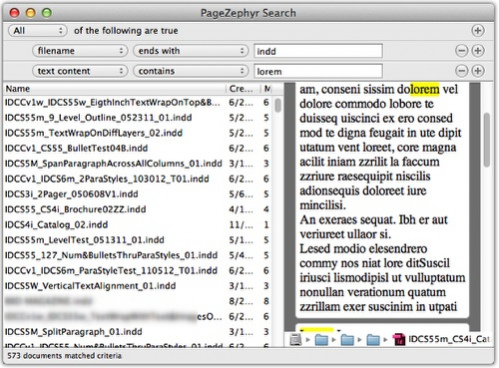
PageZephyr Search allows users to search InDesign(R) files (INDD documents) for specific text content, in conjunction with Apple(R) Spotlight(R). Text can be viewed directly within the PageZephyr Search tool or by having PageZephyr Search open the documents in InDesign. (An appropriate version of InDesign is required as PageZephyr Search is not a file conversion tool). PageZephyr Search also allows one to copy the text out of an InDesign file without having InDesign present.
PageZephyr Search Mac Features:
* indexes content easily within Apple Macintosh storage volumes that have Spotlight enabled.
* supports InDesign CS through InDesign CC native files.
* goes to the highlighted search term in InDesign for context awareness.
* does not require Adobe(R) InDesign graphic software to be installed or running.
When a user right-clicks on the highlighted word and a compatible version of InDesign is installed, PageZephyr Search Mac opens the file in InDesign and takes the user to that word in the InDesign file (INDD document). Additionally, Users can copy and paste text, in plain text format (TXT), out of PageZephyr Search into a favorite text editor or text program.
Read more: http://markzware.com/desktop-publishing/markzware-pagezephyr-search-v1-mac-indesign-cs-cc-released/#ixzz2tuexA3je
About PageZephyr Search
This program is available in English. It was last updated on 29 September, 2026. PageZephyr Search is compatible with the following operating systems: Mac.
The company that develops PageZephyr Search is Markzware. The latest version released by its developer is 3.06. This version was rated by 2 users of our site and has an average rating of 1.5.
The download we have available for PageZephyr Search has a file size of 17.8 MB. Just click the green Download button above to start the downloading process. The program is listed on our website since 2014-06-02 and was downloaded 114 times. We have already checked if the download link is safe, however for your own protection we recommend that you scan the downloaded software with your antivirus. Your antivirus may detect the PageZephyr Search as malware if the download link is broken.
How to install PageZephyr Search on your Windows device:
- Click on the Download button on our website. This will start the download from the website of the developer.
- Once the PageZephyr Search is downloaded click on it to start the setup process (assuming you are on a desktop computer).
- When the installation is finished you should be able to see and run the program.
Program Details
System requirements
Download information
Pricing
Version History
version 3.06
posted on 2014-06-02
PageZephyr is an application for OS X that allows you to search and view text in 1000′s of InDesign documents.
Read more: http://markzware.com/products/pagezephyr-search/#ixzz2tu4BEB3V
